
Omega Owners Forum

Please login or register.

Login with username, password and session length
Advanced search  

News:

Welcome to OOF

Pages: 1 2 3 4 5 6 [7] 8 9 10
 61 
 on: 25 February 2026, 10:04:37 
Started by aaronjb - Last post by Viral_Jim
That's useful to know thank you, I'm glad I wasn't missing something obvious in tinkercad.

I haven't played with the proper slicer yet, only the cloud based one and the phone app, so not sure if it's possible there but I will have a play at some point.

The main use case I've got is exactly as you described here, labels, raised text or similar so changing at a specific layer height should work just fine for me.  :y

 62 
 on: 25 February 2026, 09:44:16 
Started by aaronjb - Last post by TheBoy
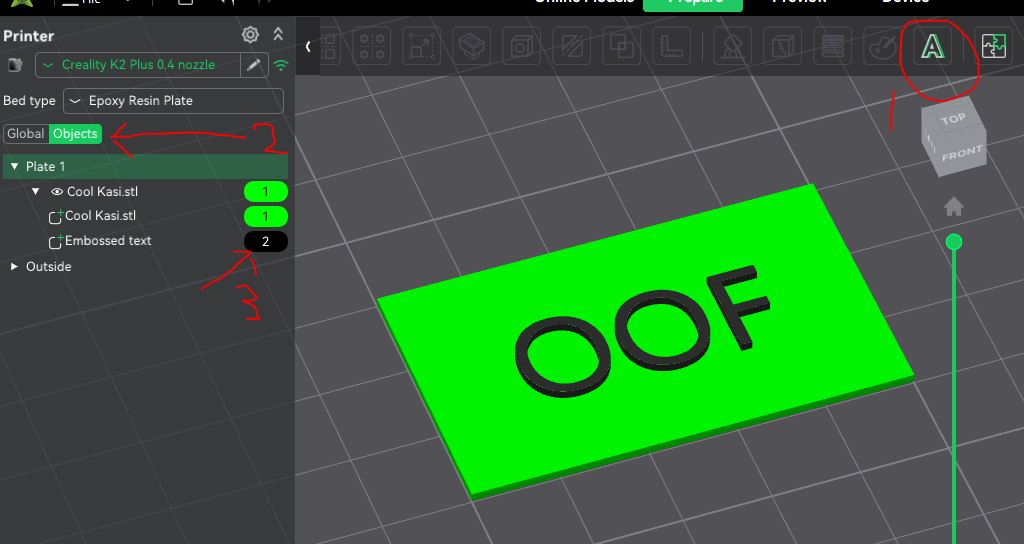
So, these are easy to create using the Layer Painting in Creality Print.  Just create the model in Tinkercad, and paint the top 3-5 layers as black.


Or painting using objects, create a flat 50x30x1mm rectangle, import into Creality Print, use the Test Tool to add the text, and change the colour of the Text object to Black:


 63 
 on: 25 February 2026, 09:26:38 
Started by aaronjb - Last post by TheBoy
Yes, the STL files is simply a set of triangles, nothing more.  Colour is done in the slicer, and you're in for another learning curve there.

In Creality Print, it's call painting, and they is a paint icon at the top.  This is a bit limited, but gives some options, like layer level painting, or fills etc.  Plenty on gayTube about Creality Print painting, which will explain better than a paragraph or 2 here.  I find it limited, and a pain to edit if you need to make a change, and often end up clearing all painting and starting again.  But its handy for first steps.


Additionally, and more usefully in my opinion, you can also paint at an object level.  Objects can be seperate models (though thats a dumb idea, as will cause massive pooping), or text that you add via the Text button at top, or "modifiers" (right like the model, then select modifiers, and the modifier shape).  The latter allows SVG file imports, so great for logos and simple pictures.

When painting at the object level, you need to change the view from "Global" to "Object", which is an option on the left of the screen, and it will list the colour against each object or modifier, which obviously you can change.


 64 
 on: 25 February 2026, 09:12:36 
Started by chrisr - Last post by TheBoy
No aware of a guide, but 4 pot should be easier than V6 due to less intake stuff to remove.

Its a case of draining, and just working your way through.  If its an auto, you will need to undo the auto cooler connections, and some cars have the A/C condenser pipers stupidly going over the top of the rad, meaning they have to be disconnected as well.

From memory, its:
3 coolant pipes
2 electrical connectors
2 autobox cooler pipes (if auto)
1 pair of A/C lines if they go over top of rad - if they go to side, you can leave undisturbed

The rad is held in with a large clip each side at the top. you may have to remove the condensor screws at top to allow sufficient movement.

 65 
 on: 24 February 2026, 21:02:01 
Started by chrisr - Last post by chrisr
Is there a step by step guide to replace the radiator on a 2002 2.2 petrol? I've been putting it off for a while now but really need to get it done soon. Is there anything I need to watch out for?
Thanks.

 66 
 on: 24 February 2026, 18:34:35 
Started by Darth Loo-knee - Last post by Doctor Gollum
Front brakes reassembled and gave it a bath. Scrubbed up nicely. 8)

Managed not to make too much mess but a litre of brake fluid was barely enough. :o

Booked in for a brake fluid change on Thursday just to make sure the air is all out of it and to change the fluid on the rears.

Still waiting on Don't Handle Logistics to deliver the tyres so I can get them fitted and then start thinking about getting the MoT done.

 67 
 on: 24 February 2026, 17:55:43 
Started by Varche - Last post by Varche
 ;D

 68 
 on: 24 February 2026, 17:22:36 
Started by 2boxerdogs - Last post by ronnyd
Loam

 69 
 on: 24 February 2026, 15:23:45 
Started by aaronjb - Last post by Viral_Jim
The RFID type you need are MiFare Classic 1k.  In UK, I was struggling to get them for less than around 40p each in quantities less than 50.  Someone on Ebay doing 100 for about £22 delivered.  I've got a load coming from aliexpress, something like £9 for 80 - I can let you know the item number when they arrive and I've tested.

I ordered some off eGay and they work, but aren't cheap enough for me to want to use them as disposable.

I haven't yet found a way of doing multi colour printing of on my own designs out of tinkerCad. Well, I can print in two parts and glue them together obviously, but this seems like a faff compared to just getting the printer to do it. Do you know if there is a way of doing this? Whenever I do a multicolour model in tinkerCad, the stl just comes out as a single piece in a single colour.  :-\

 70 
 on: 24 February 2026, 15:19:57 
Started by Varche - Last post by Viral_Jim
My dad has a 250L diesel one he inherited from a builder who didn't want to come back and fix some snagging, so left all his tools instead  :o.

I'm not sure how old that one is, but it was made in West Germany, which is definitely an indication. In its 15yrs with us its wanted only for a new set of phosphor bronze bushes. I fully expect to be inheriting that when he passes, and I will warn the lad to expect it when my time comes  ;D

Pages: 1 2 3 4 5 6 [7] 8 9 10

Page created in 0.03 seconds with 15 queries.